
FlowVPN advanced VPN protocols
VPN Blocked? FlowVPN Gives You More Ways to Connect.
FlowVPN combines exclusive FlowTCP technology with advanced encrypted tunnelling to help you connect securely on networks where ordinary VPNs struggle.
Already have the app? See the step-by-step guide
Engineered for difficult networks
One VPN. More ways to connect.
TLS HTTPS
TLS SMTP
SSH VPN
Protocol availability varies by device and app version.
Why choose FlowVPN
Advanced firewall bypass. Built into your VPN.
Three ways FlowVPN helps when restrictive networks get in the way.
Connect on Restrictive Networks
Advanced encrypted tunnelling gives FlowVPN more ways to connect when networks block conventional VPN traffic.
Exclusive FlowTCP Technology
Our proprietary WireGuard-based TCP technology provides an alternative on networks where standard UDP VPN connections are restricted.
More Ways to Stay Connected
Switch between FlowTCP, TLS HTTPS, TLS SMTP and SSH VPN where supported, with optional custom TLS hostname settings.
All the standard VPN protocols, too.
FlowVPN also supports trusted, industry-standard VPN protocols including IPSec, OpenVPN and WireGuard. Choose a familiar protocol for everyday use, or switch to advanced FlowVPN tunnelling when your network is restrictive.
Easy protocol switching
How to change your VPN protocol
No complex setup. Select an available protocol in the FlowVPN app, choose a server and connect. Follow the instructions for your device.
Setup instructions
Windows
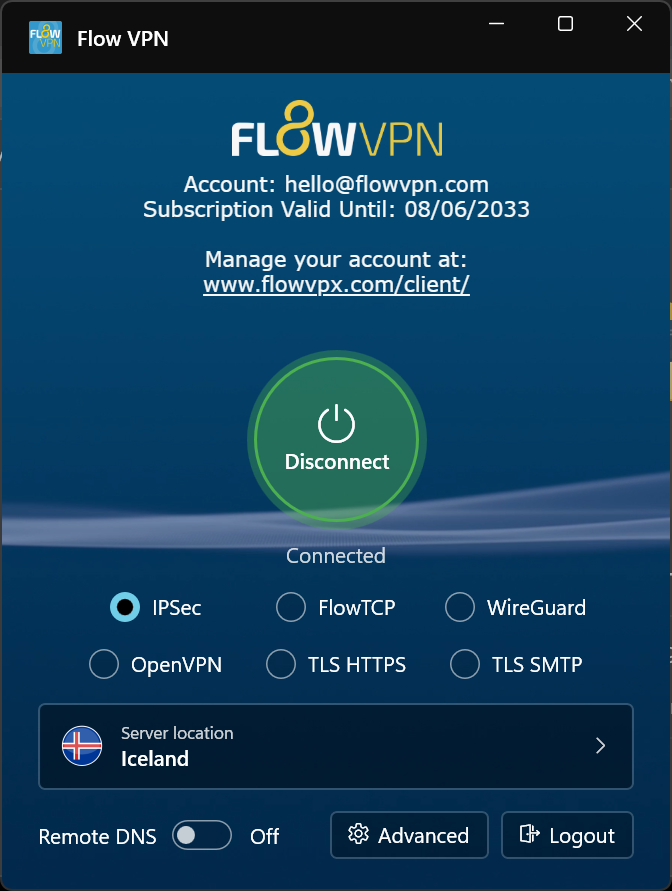
Choose a connection protocol directly from the main FlowVPN window.
- Open FlowVPN for Windows.
- Select FlowTCP, TLS HTTPS or TLS SMTP from the protocol options on the main screen.
- Choose a server location and click Connect.
Select a screenshot to see it at full size.
Setup instructions
Android
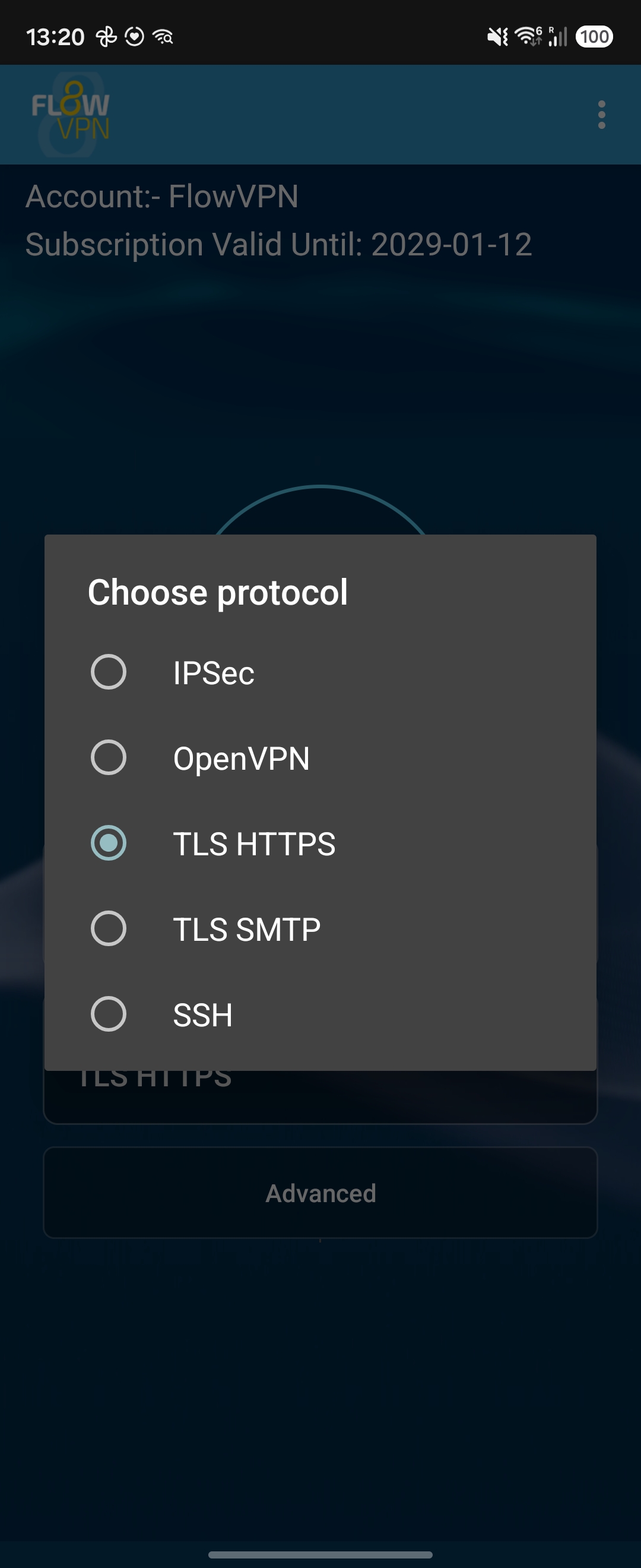
Open the protocol selector to view the available connection methods.
- Open the FlowVPN Android app.
- Tap the current protocol to open the list, then choose TLS HTTPS, TLS SMTP or SSH.
- Select a server and tap Connect.
Select a screenshot to see it at full size.
Setup instructions
iPhone and iPad
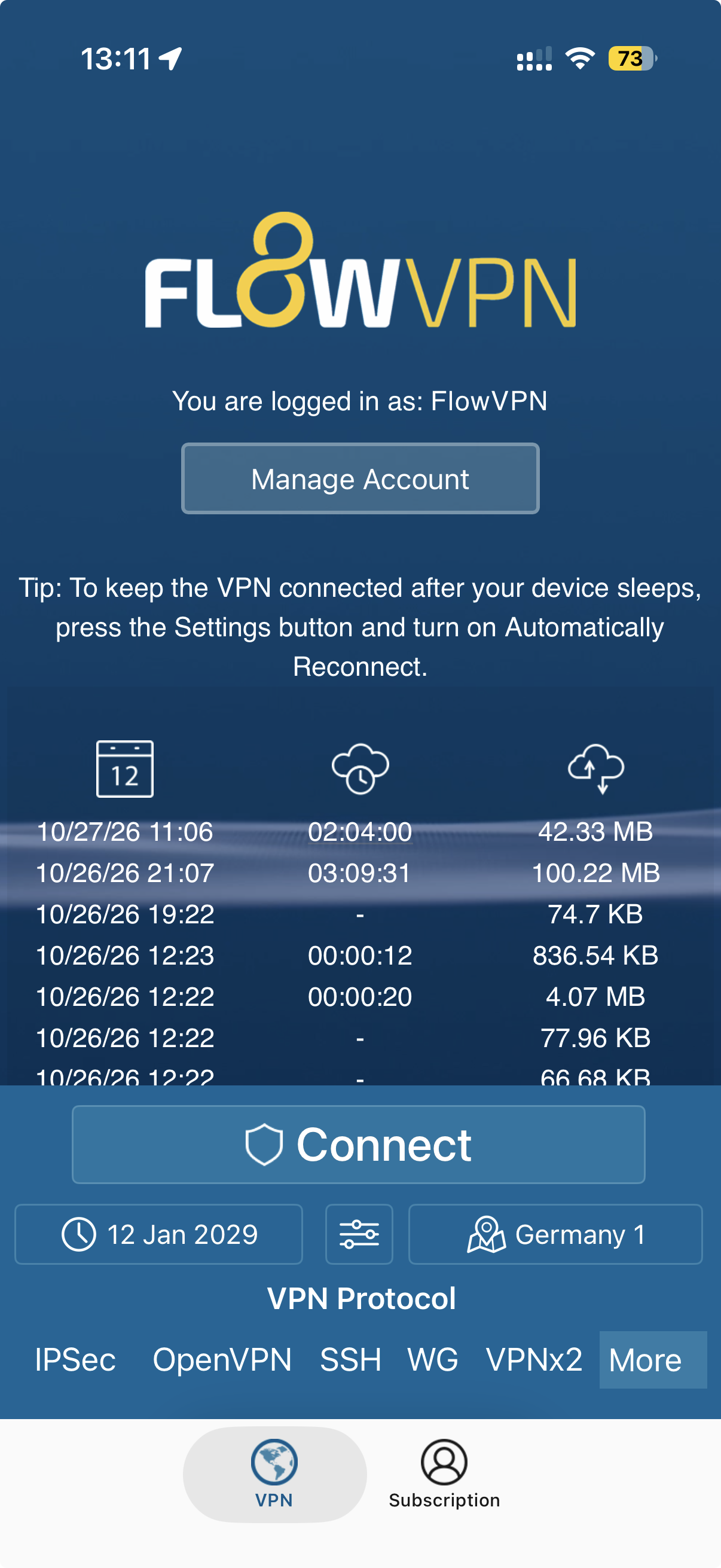
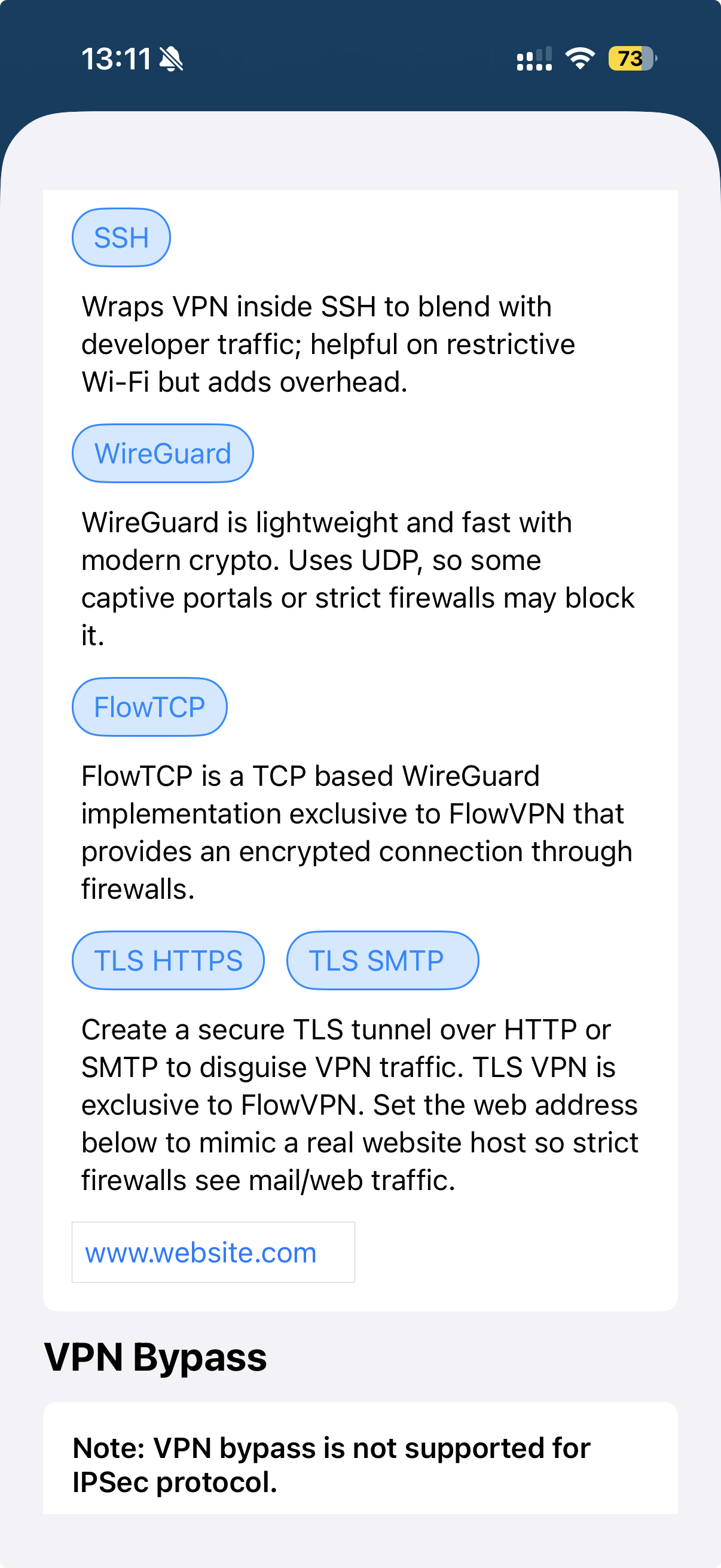
Open the full protocol list using More or the three-dot menu.
- Open FlowVPN and find VPN Protocol near the bottom of the screen.
- Tap More at the right of the protocol choices, or the three-dot option in app versions that display it.
- Choose the protocol you want from the full list, then tap Connect.
Select a screenshot to see it at full size.
Setup instructions
macOS
Choose your protocol through the Advanced VPN menu in the Mac menu bar.
- Open the main FlowVPN window on your Mac.
- In the menu bar, open Advanced VPN and select FlowTCP, TLS HTTPS, TLS SMTP or SSH VPN.
- Choose a server location and connect.
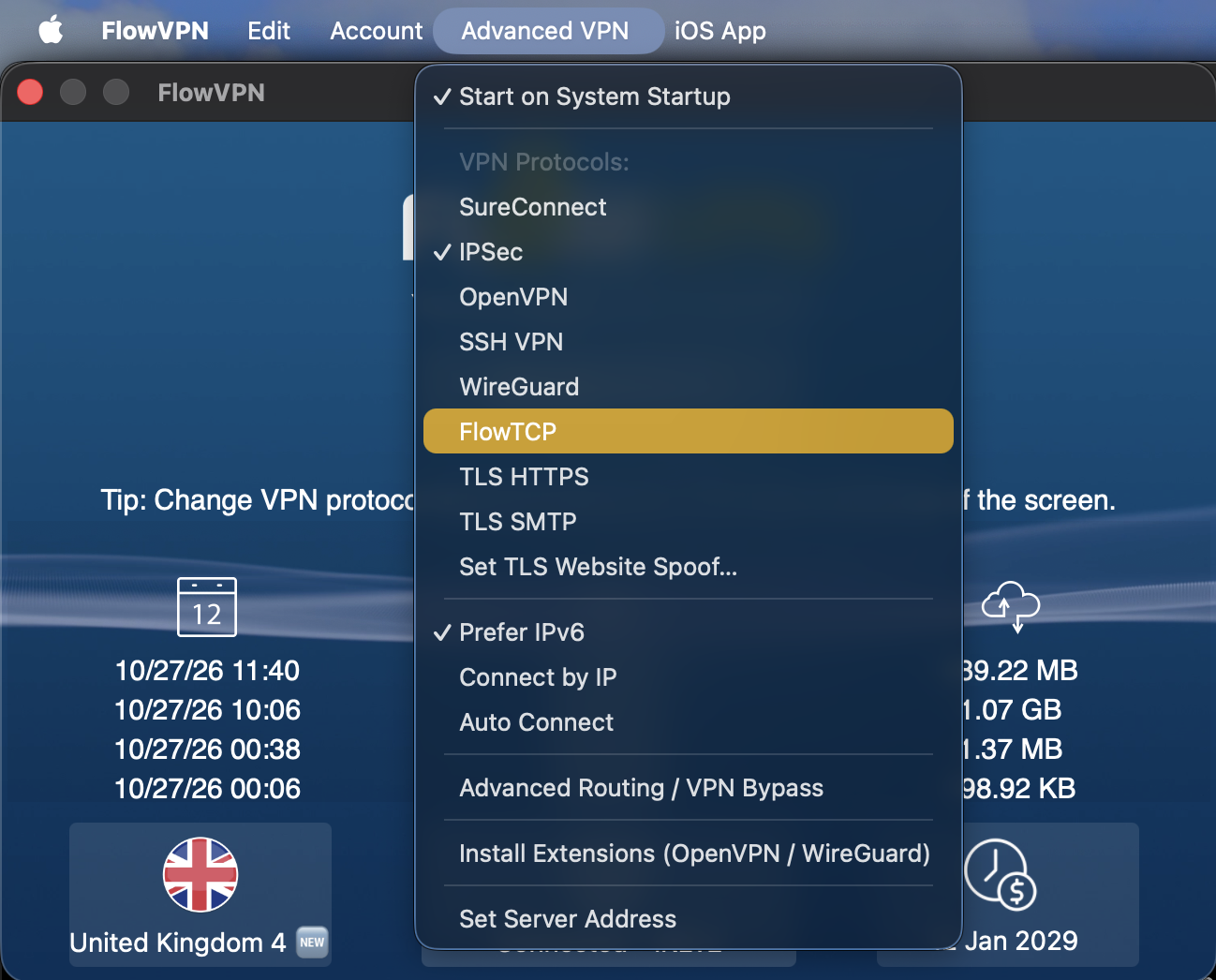
Select a screenshot to see it at full size.
Behind the connection
How FlowVPN bypass protocols work
FlowVPN combines proven VPN encryption with proprietary technology and several encrypted transport methods designed for restrictive networks.
FlowTCP: WireGuard-Based VPN Over TCP
FlowTCP is FlowVPN's proprietary TCP implementation based on WireGuard technology. It offers an additional encrypted connection method on networks where UDP VPN traffic is blocked or limited.
TLS HTTPS: A Secure Web-Friendly Transport
TLS HTTPS carries the VPN connection inside an encrypted TLS transport over TCP port 443. It can help when a network allows HTTPS connections but restricts recognisable VPN protocols.
TLS SMTP: Another Encrypted Connection Option
TLS SMTP offers an additional VPN transport based on TLS connections associated with secure email services. Different network rules can make this useful when another protocol does not connect.
SSH VPN: An Alternative Tunnel
SSH VPN carries VPN traffic within an encrypted SSH connection, providing another option for networks that restrict ordinary VPN connections.
Custom TLS Hostnames and Dynamic Certificates
For advanced use, supported FlowVPN TLS transports allow a configurable TLS hostname. FlowVPN can dynamically generate and sign certificates for its tunnelling infrastructure, offering additional flexibility when connecting through restrictive networks.
Questions and answers
VPN protocols: frequently asked questions
What should I do if my VPN is blocked by a firewall?
Open FlowVPN and try FlowTCP or TLS HTTPS if they appear in your app. If the connection is still blocked, try another available option such as TLS SMTP or SSH VPN. Connection success depends on the network.
Why can't I see FlowTCP or the newer TLS protocols?
These are newer FlowVPN features. Install the latest version of FlowVPN, reopen the app and check the protocol list again. Available options vary by platform and app version.
Does FlowVPN also support standard VPN protocols?
Yes. FlowVPN also supports industry-standard VPN protocols including IPSec, OpenVPN and WireGuard. Use these for everyday connections or try the advanced transports when your network is restrictive.
Are FlowTCP and TLS HTTPS the same thing?
No. FlowTCP is FlowVPN's proprietary WireGuard-based TCP implementation. TLS HTTPS uses an encrypted TLS transport to carry the VPN connection. They provide different options on restrictive networks.
Will these protocols get through every firewall?
No VPN connection method works on every network. FlowVPN offers multiple technologies to try when a conventional connection is blocked.
Do I need to configure a TLS hostname?
Usually not. First select an available protocol and connect. Custom TLS hostname configuration is an optional advanced setting.
When one VPN protocol is blocked, try another.
FlowVPN brings standard VPN security, exclusive FlowTCP and advanced TLS tunnelling together in one service.
Advanced protocol availability varies by device and app version. No VPN can guarantee a connection on every network.